
Some time ago we wrote about an annoying console bug in SCOM 2025 RTM: SCOM 2025 Console Authoring pane issue. Microsoft fixed it in SCOM 2025 Update Rollup 1. Lately, we have seen the very same issue show up in SCOM 2022 environments after installing Update Rollup 4 (UR4).
If you manage SCOM 2022 and have just applied UR4, this one is worth knowing about.
What you will see
Open the SCOM console, go to the Authoring pane and click Monitors. Right away an error pop-up appears:
The requested resource is in use. (Exception from HRESULT: 0x800700AA)
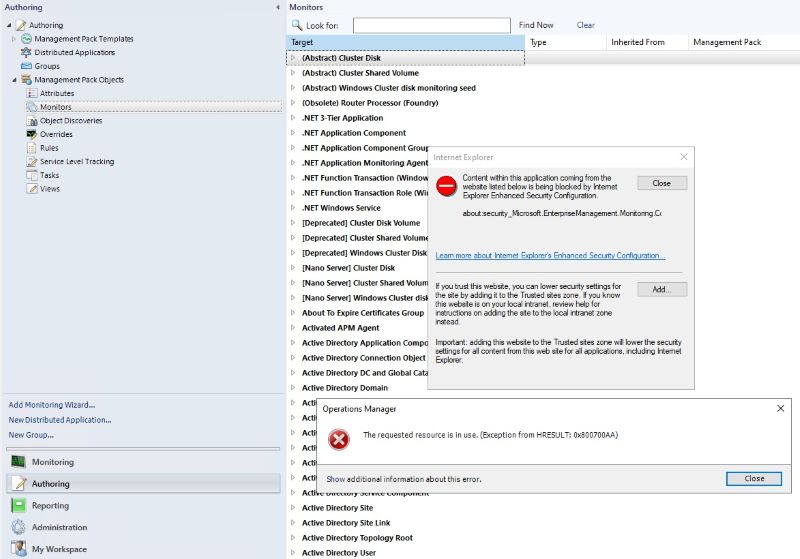
The stack trace points to a COM exception in System.Windows.Forms.WebBrowser while the console loads the MonitorDetailsView. As a result, you cannot view or edit monitors in a normal way.
Why it happens
The cause is the same as in SCOM 2025 RTM. The console uses an embedded web browser control to show monitor details. Together with Internet Explorer Enhanced Security Configuration settings, this control runs into a resource conflict and fails to load.
The fix
The same workaround from our SCOM 2025 post works here too. On the machine where you run the SCOM 2022 console:
- Open Control Panel > Network and Internet > Internet Options.
- Go to the Security tab, select Trusted sites and click Sites.
- Add this entry:
about:security_Microsoft.EnterpriseManagement.Monitoring.Console.exe - Click Close, then OK.
- Restart the SCOM console and open the Monitors view again.
In larger environments, you can push this trusted site entry to all console machines with a Group Policy (Site to Zone Assignment List).
Will Microsoft fix it?
For SCOM 2025, the fix came with UR1. We expect a similar fix for SCOM 2022 in a future update. Until then, the trusted site entry above is a quick and safe way to keep working. We will update this post when we know more.
For the full background, screenshots and the original analysis, read our earlier post: SCOM 2025 Console Authoring pane issue.
Have you seen this issue after UR4, or found another workaround? Let us know in the comments.